App Store conversion rates: what every chart in Flux means
Understand all six App Store conversion charts in Flux, with formulas, examples, and the differences between page views, direct downloads, new users, and purchases.

We open our app’s analytics and see six conversion charts. One says 20.8%. Another says 1.9%. A third says 9.7%. They all describe the same app, but each starts counting from a different place.
That’s what makes conversion useful. It lets us ask a more specific question than “Are downloads going up?” Are people opening the product page? Are they downloading straight from a search result? Is the app reaching new users, or bringing existing users back?
This guide explains the six charts in Flux, how each rate is calculated, and what we can learn from it. The screenshots cover September 18 to October 17, 2026. Their percentages are examples to explain the metrics, not targets for every app.
Start with what each rate counts
Every rate below divides one count by another, then multiplies by 100. The denominator—the count we divide by—tells us what the percentage means.
In these charts, views means App Store product page views, and first-time downloads excludes redownloads. Total downloads includes both. Ordinary impression and page-view counts can include repeated views; unique-device impressions count devices within the reporting scope, rather than every appearance. A device count is still different from a count of individual people.
| Chart | Calculation | What it helps us understand |
|---|---|---|
| Impressions to Views | Product page views ÷ impressions | Interest in opening the listing |
| Views to Downloads | First-time downloads attributed to a page ÷ product page views | Downloads through the page route |
| Impressions to Direct Downloads | Direct first-time downloads ÷ impressions | Downloads without opening a product page |
| New-User Conversion | First-time downloads ÷ unique-device impressions | Acquisition of new users |
| Store Conversion | First-time downloads plus redownloads ÷ unique-device impressions | Overall download activity relative to visibility |
| Downloads to Purchases | Reported purchases ÷ first-time downloads | Purchase activity relative to new downloads in the period |
These are the calculations used by Flux. For the underlying terms, Apple’s metric definitions explain impressions, page views, first-time downloads, redownloads, and purchase counts.
Impressions to Views: do people open the product page?
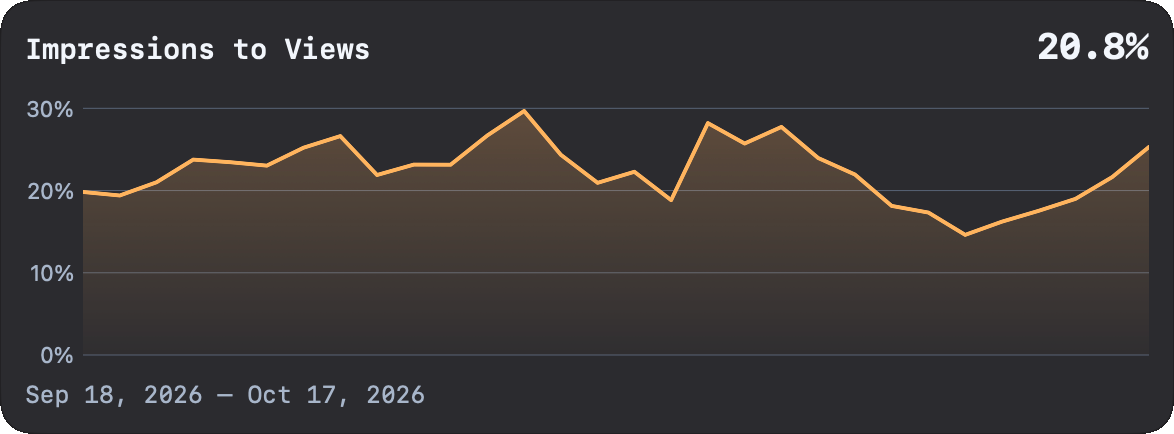
Product page views ÷ impressions × 100.
This rate helps us understand how much product-page interest accompanies the app’s visibility. As a simple arithmetic example, 2,080 page views divided by 10,000 impressions gives 20.8%. Those counts illustrate the formula; the screenshot doesn’t show the underlying totals.
Think about what someone sees before opening the full listing: the app’s name, icon, subtitle, and any screenshots shown in that placement. Do those details make the app’s purpose clear? Is it appearing for searches that match what it actually does?
A falling rate is a reason to investigate the audience and placement. It doesn’t prove the listing got worse. More exposure to a broader audience can change the ratio. And because these are aggregate counts, including repeat views, 20.8% doesn’t establish that exactly 20.8% of individual viewers tapped through.
Views to Downloads: does the page lead to a download?
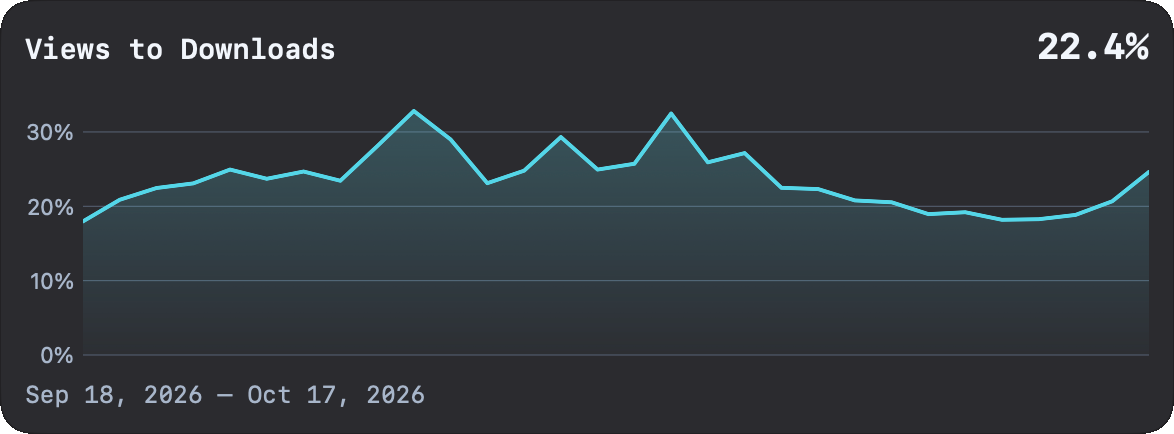
First-time downloads attributed to a page ÷ product page views × 100.
Once someone opens the product page, they have more information to work with. The screenshots, description, reviews, and pricing can help them decide whether the app fits their need.
Flux uses first-time downloads attributed to a page for this chart. It doesn’t put every download into the numerator: direct downloads belong to a separate route. At 22.4%, the ratio is equivalent to 224 page-attributed first-time downloads for every 1,000 page views.
If page views rise while this rate falls, review whether the listing delivers on the promise that brought visitors there. Check the first screenshots, the explanation of the app’s value, and any uncertainty about what’s included. Compare similar audiences and periods before attributing the change to a particular screenshot or piece of copy.
Impressions to Direct Downloads: who skips the product page?
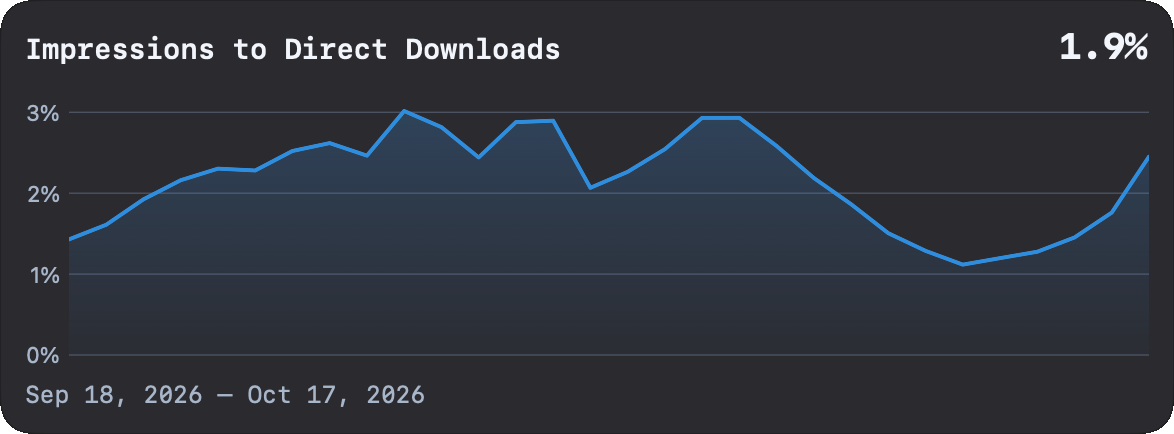
Direct first-time downloads ÷ impressions × 100.
People can download an app without opening its full product page—for example, from a search result with a download button. Flux counts first-time downloads reported with the “No Page” attribution in this direct route. Downloads with missing page attribution aren’t automatically treated as direct.
The 1.9% shown here is equivalent to 190 direct first-time downloads per 10,000 impressions. It doesn’t mean that 1.9% of all downloads were direct; that would use downloads as the denominator.
This chart explains why a product-page funnel can miss part of the story. Someone who already recognizes the app may have enough information to download immediately. A change in direct downloads can help us decide how much attention to give the app’s appearance in search and other store placements, alongside the full product page.
New-User Conversion: how well does visibility bring new downloads?
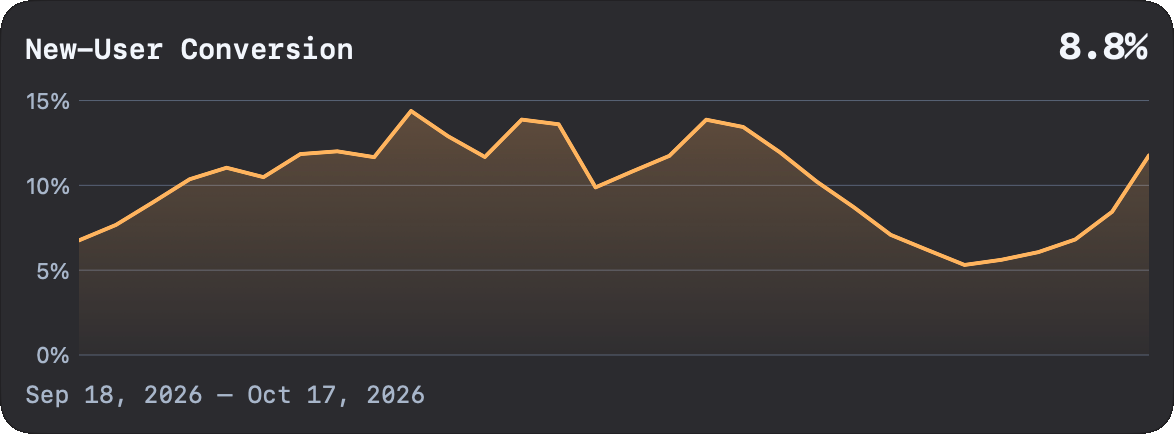
First-time downloads ÷ unique-device impressions × 100.
This rate brings the download routes together and leaves redownloads out. It asks how new acquisition compares with the app’s visibility, using the reported unique-device impression counts.
At 8.8%, the ratio is equivalent to 880 first-time downloads per 10,000 unique-device impressions. The word “new” describes the download metric. It doesn’t tell us whether someone completed onboarding, used the app regularly, or paid.
Use it when the question is whether the store presence is attracting first-time downloads. Read the rate alongside the download count: a lower percentage can still accompany more new downloads if visibility grows enough.
Store Conversion: what changes when redownloads count too?
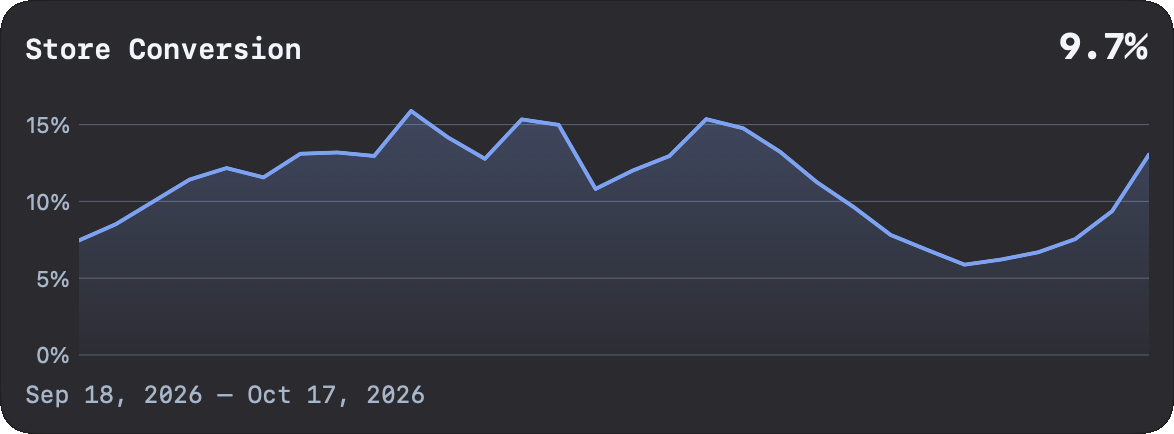
(First-time downloads + redownloads) ÷ unique-device impressions × 100.
Store Conversion gives us the broader download picture. Someone returning to download the app again contributes to this rate, even though that download doesn’t represent a newly acquired user.
The screenshots show 9.7% Store Conversion and 8.8% New-User Conversion. With matching coverage and denominator, the gap reflects redownload activity. The displayed difference is about 0.9 percentage points; the figures are rounded.
If Store Conversion improves while New-User Conversion stays steady, check whether redownloads account for the improvement before calling it stronger new-user acquisition.
Downloads to Purchases: how does purchase activity compare with new downloads?
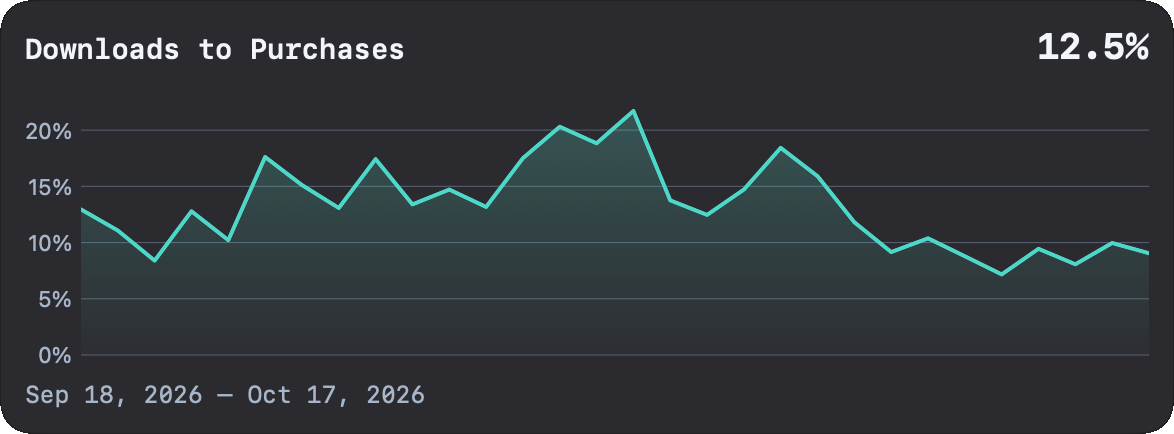
Reported purchases ÷ first-time downloads × 100.
This chart compares reported purchase activity with first-time downloads over matching available dates. For example, 125 purchases divided by 1,000 first-time downloads gives 12.5%.
That doesn’t establish that 125 of those 1,000 new users paid. Purchases in the period can come from people who downloaded earlier, and a purchase count is different from a count of unique paying users. Apple’s purchase metric definitions also explain that In-App Purchase counts include subscription renewals.
Use this ratio to notice changes worth investigating in purchase activity relative to acquisition. To answer “What share of this month’s new users paid within 30 days?”, we need a cohort analysis that follows that same group over time. The conversion chart alone can’t answer it, and its ratio can exceed 100%.
Read the charts together before choosing what to change
Start with the question you’re trying to answer. For interest in the listing, look at Impressions to Views. For downloads through the page, look at Views to Downloads. Check direct downloads before assuming everyone needs to open the page. Then compare New-User Conversion with Store Conversion to understand the contribution of redownloads.
A few habits make those comparisons more useful:
- Check counts as well as rates. One download from ten views and 100 from 1,000 both give 10%, but the smaller sample will move much more easily.
- Compare matching periods and audiences. Changes in traffic source, country, or platform can shift the combined rate even when the listing stays the same.
- Allow for report availability. Flux uses matching source coverage for rates that combine reports. An unavailable rate isn’t the same as confirmed zero activity.
- Use the period summary correctly. Flux divides the relevant summed counts. It doesn’t simply average the daily percentages. Reported unique-device counts are aggregated, so don’t read them as a deduplicated count of people across the whole period.
Don’t add the six percentages or multiply them into one end-to-end conversion rate. They mix ordinary impressions, unique-device impressions, separate download routes, and purchases from different users.
The useful outcome is a decision we can act on: clarify the search listing, improve the product page, investigate returning downloads, or examine what happens after installation. Choose one question, make a focused change, and give the next comparison enough data to tell us something.